LSL #nbitsLogical shift left bynbits.LSR #nbitsLogical shift right bynbits.ASR #nbitsArithmetic shift right bynbits, keeping signed bit on the left.ROR #nbitsRotate right bynbits.
MOV can move into register only 16-bit at a time. So to load a 64-bit value, we need to shift a maximum of 4 times with MOVK.
MOV Xd, #imm16 moves imm16 into Xd
MOVK Xd, #imm16 moves imm16 into Xd while keeping original data in Xd
MOVK Xd, #imm16, LSL #4 logical shift left imm16 by 4-bits
MOVN Xd, #imm16 moves logical NOT of imm16 into Xd
The basic form of ADD and SUB adds/substracts Xs with Operand2, then store the result in Xd.
ADD{S}      Xd, Xs, Operand2
ADC{S}      Xd, Xs, Operand2

SUB{S}      Xd, Xs, Operand2
SBC{S}      Xd, Xs, Operant2
There are cases where a number might be greater than 64-bit, so we need multiple registers. ADDS and SUBS does the same work as ADD and SUB, but also adds a carry/borrow condition in the NZCV register.
Think about carry and borrow in arithmetic. The NZCV register is the 1 when you do carry/borrow.
The ADC/SBC works based on the previous ADDS/SUBS carry/borrow condition. The ADCS/SBCS sets the carry/borrow just like ADDS/SUBS.
Example:
// Simple addition/subtraction with one register sized-number
ADD     X0, X1, #4  // X0 = X1 + 4
SUB     X2, X3, X4 // X2 = X3 - X4

// Adding and subtracting a 192-bit number
ADDS    X0, X3, #1  // Add lower bits and set carry
ADCS    X1, X4, #1  // Add middle bits with carry, and set a new carry
ADC     X2, X5, #1  // Add higher bits with carry

SUBS    X0, X3, #1  // Subtract lower bits and set borrow
SBCS    X1, X4, #1  // Subtract middle bits with borrow, and set a new carry
SBC X2, X5, #1 // Subtract higher bits with borrowComparisons, ADDS/SUBS, or S-variant logical operators sets the NZCV register (CPSR in ARM) used for branching.
| Suffix | Flags | Meaning |
|---|---|---|
| EQ | Z set | Equal |
| NE | Z clear | Not equal |
| CS or HS | C set | Higher or same (unsigned >=) |
| CC or LO | C clear | Lower (unsigned <) |
| MI | N set | Negative |
| PL | N clear | Positive or zero |
| VS | V set | Overflow |
| VC | V clear | No overflow |
| HI | C set and Z clear | Higher (unsigned >) |
| LS | C clear or Z set | Lower or same (unsigned <=) |
| GE | N and V the same | Signed >= |
| LT | N and V differ | Signed < |
| GT | Z clear, N and V the same | Signed > |
| LE | Z set, N and V differ | Signed <= |
| AL | Any | Always. This suffix is normally omitted. |
MUL only saves the lower 64-bit of the multiplication from two 64-bit registers:
// Multiply Xn by Xm and store the lower 64-bit in Xd
MUL     Xd, Xn, Xm
SMULH and UMULH saves the upper 64-bit of multiplication:
// Signed upper 64-bit
SMULH   Xd, Xn, Xm

// Unsigned upper 64-bit
UMULH   Xd, Xn, Xm
Multiply two 32-bit registers and store full result in 64-bit register:
// Signed
SMULL   Xd, Wn, Wm

// Unsigned
UMULL   Xd, Wn, Wm
Negatives of multiplication:
// Calculates -(Xn * Xm)
MNEG    Xd, Xn, Xm

// Signed 32-bit version
SMNEGL  Xd, Wn, Wm

// Unsigned 32-bit version
UMNEGL Xd, Wn, WmDoes multiplication with accumulation:
ADDones:Xd = Xa + Xn * XmSUBones:Xd = Xa - Xn * XmXacan be the same asXd- Similarly for
Wregister ones
MADD    Xd, Xn, Xm, Xa
MSUB    Xd, Xn, Xm, Xa

// 32-bit variants
SMADDL  Xd, Wn, Wm, Xa
UMADDL  Xd, Wn, Wm, Xa
SMSUBL  Xd, Wn, Wm, Xa
UMSUBL Xd, Wn, Wm, Xa// Signed divide Xn by Xm and store in Xd
SDIV Xd, Xn, Xm
// Unsigned divide Xn by Xm and store in Xd
UDIV Xd, Xn, XmDivide doesn’t throw division by zero error, but just returns 0.
Condition is bad for performance!
Usually CMP comparing two registers by substraction.
CMN: Uses addition instead of subtraction.
TST: Performs a bitwise AND operation between Xn and Operand2.
Comparison stores the result in the NZCV register, to be used later with branching instruction.
Branching retrieves the NZCV registers value and performs condition based on it.
// Jump to branch without testing condition
B   branch_name

//  Jump to function
BL  function_name
CMP X1, X2 // Or SUBS X2, X2, #1, which means testing if X2 reaches 0
// Use comparison value stored in NZCV register to determine condition
B.{condition} branch_name
cont:
// continue
branch_name:
// Do some work in branch
B cont // Go to cont// W2-- until W2 is 0
loop:
SUBS W2, W2, #1 // Note the S at the end of SUBS
B.NE loop // Go to loop if not equalAND is useful for masking bits with Operand2, ORR is useful for setting bits.
S variant sets the NZDV register.
AND{S} Xd, Xs, Operand2  // Bitwise AND between Xs and Operand2
EOR{S} Xd, Xs, Operand2  // Bitwise XOR between Xs and Operand2
ORR{S} Xd, Xs, Operand2  // Bitwise OR between Xs and Operand2
BIC{S} Xd, Xs, Operand2 // Bitwise Xs AND NOT Operand2Two ways of importing:
- Include: In main, use
.include "file.s". The file won’t need to be assembled to.ofile. - Assemble then link:
.global func_namemakesfunc_namefunction available for other programs.
Only one program can be called_start.
gcc compiles .S file with C-style includes with capital S.
Good for performance, bad for conserving memory.
Inserts copy of the code at every point used, so no need to push/pop stack.
Example:
.MACRO macroname parameter1, parameter2,...
2:
    // Some work
    B.NE 2b
    B 1f
    // ...
1:
    // Some other work
.ENDM
If macro is used multiple times, duplicate text labels will create conflict. ARM allows using duplicate numeric labels like 1, 2, 3…
e.g.:
2b– label 2 in backward direction1f– label 1 in forward direction
Bad for performance, good for conserving memory. Usually needs to push/pop stack when calling.
BL func_name calls the func_name function.
RET in the function returns with result in X0 register.
Registers:
X0-X7– Argument registers. Function parameters that can be used by the function.X0-X18might be corrupted after running the function, so any value must be saved to stack before calling function.X19-X30– Callee-saved registers. Caller assumes they stay unchanged. If used by the function, must be saved within the function and restored before return.LRstores where the next instruction is after function, so must be saved to stack if calling a nested function within the function.- Calling
RETresumes execution from currentLRpointed instruction.
- Calling
See Page 143 ARM 64 assembly book
Using Extern
When you use it as an extern, e.g.:
extern int mytoupper( char *, char * );- The first
char*input goes toX0, the secondchar*input goes toX1, and so on… - The returned int goes to
X0
Using Inline
When you use it inline, e.g.:
__asm__ volatile(
        "mov    X3, %2\n"
        "loop:\n"
        "LDRB   W4, [%1], #1\n"
        "CMP    W4, #'A'\n"
        // ...
        "SUB    %0, %2, X3\n"

        : "=r"(len)  // OutputOperands: "=r"(len) means write to operand, corresponds to %0 in the asm
        : "r"(str), "r"(outBuf) // InputOperands: "r"(str) means input with variable "str". str and outBuf corresponds to %1 and %2 in the asm
: "r3", "r4"); // Clobbers: registers that might be used by the asm so C compiler will avoid (note it is r not X or W)- The output is aliased as
%0 - The input variables start from
%1,%2, and so on…
IMPORTANT: Pointer vs Value
LDR Xd, =labelorSTR Xd, =labelloads/stores from pointer from/to the label addressLDR Xd, labelorSTR Xd, labelloads/stores directly from/to the label’s contentUse pointer for strings, arrays, etc. just like you use it in C.
Square bracket on [Xn] signifies load from the memory address stored in Xn, not the register content of Xn.
Even though the stack grows downward, the memory save and load instructions access low -> high memory address.
// Load the address of mynumber into X1 (X1 is a pointer)
LDR X1, =mynumber

// Load mynumber pointed to by X1 into X2
LDR X2, [X1]

// Or load mynumber's value directly into X2
LDR X2, number

.data
mynumber: .quad 0x123456789ABCDEF0
To load types other than word or quad, and pad correctly:
LDR{type} Xt, [Xa] // Xa is a pointer to the addressType can be one of the following:
| Type | Meaning |
|---|---|
| B | Unsigned byte |
| SB | Signed byte |
| H | Unsigned halfword (16 bits) |
| SH | Signed halfword (16 bits) |
| SW | Signed word |
-
Pre-indexing:
STP LR, FP, [SP, #-16]!Memory address updated
SPis first updated toSP = SP - 16- Then
LRandFPare stored in increasing memory address from the newSPaddress (LR -> [SP]andFP -> [SP + #8])
-
Post-indexing:
LDR LR, FP, [SP], #16Memory accessed first
LRandFPare loaded fromSPandSP + 8- Then SP is updated to
SP = SP + 16after the memory operation
Example:
// Assume X0 = 0x1000
// Load memory content from 0x1000 + 16 = 0x1010 to 0x1017
LDR X1, [X0, #16]

// Update X0 to 0x1010, then load memory content from 0x1010 to 0x1017
LDR X1, [X0, #16]!

// Load memory from 0x1000-0x1008, then update X0 to 0x1010
LDR X1, [X0], #16

// Similarly for STR operations
Stack Pointer (SP) grows downwards by 16 byte aligned on ARM. Non-16-byte aligned address will crash.
Wastes memory if variables are not using all 16-byte, can be addressed by using Frame Pointer (FP)
Note there seems to be discrepancy between what is described in the book and online about whether FP should match SP or be at an offset. Here we follow the book. See this StackOverflow Discussion.

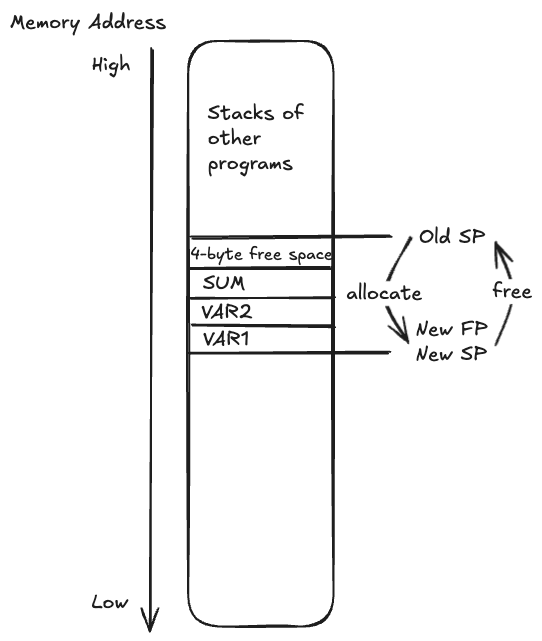
X29 register is aliased as Frame Pointer (FP), and set address relative to FP
// Assume SP = 0x1000

// Positive memory offsets relative to FP
.EQU    VAR1, 0
.EQU    VAR2, 4
.EQU    SUM,  8

SUB   FP, SP, #16
SUB   SP, SP, #16
// Now FP == SP are both 0x0FF0
// Address 0x0FF0 - 0x0FFF can be used

LDR W4, [FP, #VAR1]  // W4 loads from 0x0FF0
LDR W5, [FP, #VAR2]  // W5 loads from 0x0FF4
SUM W6, W4, W5
STR W6, [FP, #SUM]   // Store sum at 0x0FF8
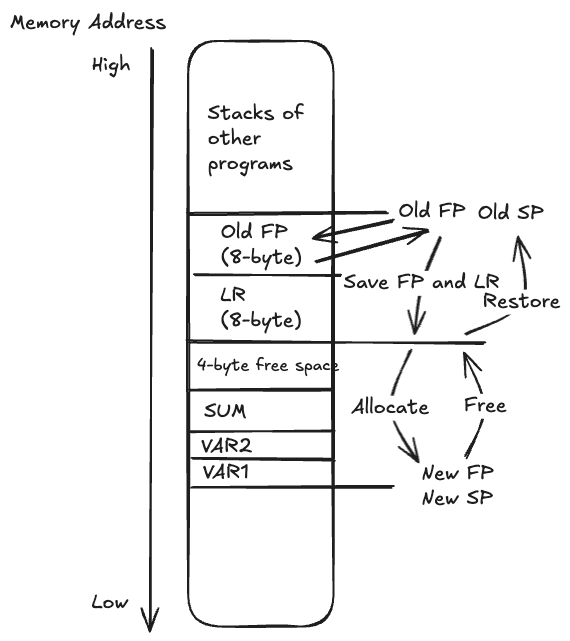
Save LR and previous program’s FP with the first 16-byte:

// Assume SP = 0x1000, Old FP = 0x1000

// Positive memory offsets relative to FP
.EQU    VAR1, 0
.EQU    VAR2, 4
.EQU    SUM,  8

// Store old FP and LR pair, now SP at 0x0FF0
STP   FP, LR, [SP, #-16]!

// Allocate stack
SUB   FP, SP, #16
SUB   SP, SP, #16
// Now FP == SP are both 0x0FE0
// Address 0x0FE0 - 0x0FF0 can be used

LDR W4, [FP, #VAR1]  // W4 loads from 0x0FE0
LDR W5, [FP, #VAR2]  // W5 loads from 0x0FE4
SUM W6, W4, W5
STR W6, [FP, #SUM]   // Store sum at 0x0FE8

// Free Stack
ADD   FP, SP, #16
ADD   SP, SP, #16
// Now FP == SP are both 0x0FF0

// Restore old FP and LR pair, now SP at 0x1000
LDP   FP, LR, [SP], #16
.text defines immutable constants. .data defines mutable variables.
.fill directive is similar to calloc() in C, where addresses are filled with an initial value. .fill 255, 1, 0 fills 255 elements, each of size 1 and value 0.
.asciz defines ascii char array with null-termination. .ascii doesn’t provide null-termination.
X0–X7 registers are used for parameters.
X8 register is used for specifying service to call.
SVC 0 means introduce software interrupt to call the service.
Return code is saved in X0.
Calculate string size example:
inpErr: .asciz	"Failed to open input file.\n"
inpErrsz: .word  .-inpErr
. means current address, so inpErrsz calculates current memory address – start of inpErr -> inpErr’s size.
Floating-point calculation introduces rounding errors over time, hence use fixed calculation in financial settings.
ARM FPU and NEON coprocessor shared registers:
V0 – V31 128-bit registers.
D0 – D31 is 64-bit double-precision version.
S0 – S31 is 32-bit single-precision version.
H0 – H31 is 16-bit half-precision version.
V0 – V7 are caller saved.
V8 – V15 are callee saved.
NEON coprocessor labels V0 – V31 as Q0 – Q31 for 128-bit integers.
NOTE with C
printf: When you use string substitution of"%f", C takes the floating point number starting fromD0–D31, instead of from the general register likeX1etc. The expected floating point format is alsodoubleprecision ONLY!Example:
// X0 has "%f\n" in message and D0 has a double floating point
LDR     X0, =message
BL      printf
Use FMOV to move between FPU registers and CPU registers
FMOV H1, W2 There are floating point versions of ADD, SUB, MUL, DIV, with F in the beginning like FADD.
There are also:
FNEG
FABS
FMAX
FMIN
FSQRT   Sd, Sn  // Sd = Sn^2
FCVT converts between single and double precisions.
There are also instructions to convert between floating-point and integers. e.g.:
SCVTF   Dd, Xm  // Signed integer to double FP
UCVTF Sd, Wm // Unsigned integer to single FPConditional select and conditional increase.
// Xd = Xn if condition is true, else Xd = Xm
CSEL    Xd, Xn, Xm, condition

// Xd = Xn if condition is true, else Xd = Xm + 1
CSINC   Xd, Xn, Xm, condition
NEON coprocessor can process data in parallel with SIMD (Single Instruction Multiple Data). It divides the 128-bit register into different lanes, then process instructions in parallel between lanes.
Check out ARN website on the lanes concept: https://developer.arm.com/documentation/102474/0100/Fundamentals-of-Armv8-Neon-technology/Registers–vectors–lanes-and-elements
NEON coprocessor shares the same registers with ARM FPU. The instructions that apply to FPU is also for NEON. But the way to address register is slightly different.
{register number}.{lane count}{lane size}See page 293 and 300 on the book
Example to add 4 single floating point (128bit-wide) from V2 and V3 to V1:
// e.g.
FADD V1.4S, V2.4S, V3.4S
Leave a Reply